
A Call Flow does nothing on its own. It only runs when a tracking number is pointed at it.
Point a Tracker at a Call Flow
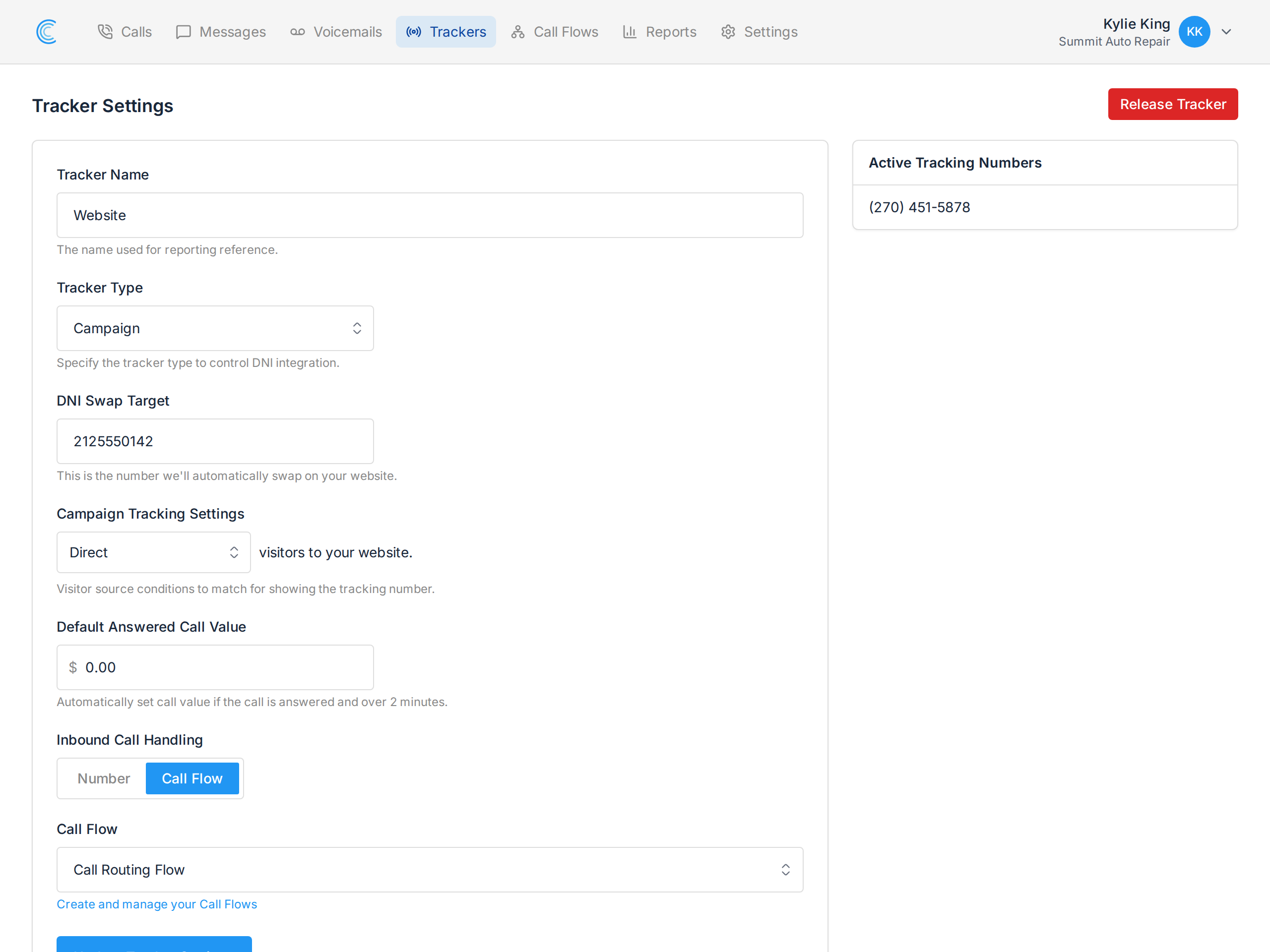
Open the tracker from your Trackers page, set Inbound Call Handling to Call Flow, choose your flow, and press Update Tracker Settings.
The alternative, Number, forwards every call straight to one destination with no greeting, no menu and no voicemail. Switching to Call Flow is what unlocks all of that.
One Flow, Many Numbers
The same call flow can handle as many tracking numbers as you like. Most businesses want identical handling everywhere — same greeting, same voicemail, same recording setting — and maintaining that once is far easier than repeating it per tracker.
The consequence is worth understanding: editing a shared flow changes every number using it. If your billboard number and your paid search number both point at "Main Line", changing the greeting changes it for both.
The call flow builder shows you this before you save. The Trackers panel on the right lists every tracker currently using the flow, so you can see the blast radius of a change while you're making it.
When you want different handling for one campaign, build a second flow rather than editing the shared one.
Changing or Removing It
Switch Inbound Call Handling back to Number and calls go straight to the destination again. The call flow itself is untouched and still available to other trackers.
Deleting a call flow that trackers are still using would leave those numbers with nothing to run, so move them to another flow first.